
Not another email provider
Templates and automations for transactional email.
Senlo sits on top of the delivery provider you already pay for. You get a visual editor, lifecycle automations and a clean API. Your provider keeps delivering.
Free for one person: 3,000 emails a month, no card.
POST /api/triggered
{
  "id": 4,
  "to": "customer@example.com",
  "data": { "order": { "number": "A-1049" } }
}Where Senlo sits
Your provider delivers. Senlo does everything before that.
Resend, Postmark and SES are good at delivering mail. They are not where your team wants to edit a template, version it, or draw an onboarding sequence. Senlo renders, personalises, tracks and decides, then hands the message to the provider you chose. Switch providers without touching a template.
How it works
Three steps to the first email.
- 01
Connect your provider
Paste a Resend, Postmark or Amazon SES key, or SMTP credentials for Mailgun or your own server. Senlo never sends from its own infrastructure.
- 02
Build the template
Drag rows and blocks, add merge tags and conditions, preview with real data. Every template is versioned and lives in a workspace, so staging and production stay apart.
- 03
Trigger it, or let an automation
One request sends a transactional email from a template. One event starts an onboarding sequence that waits, checks your API and branches.
What you get
The parts your provider leaves to you.
Automations that branch on your own data
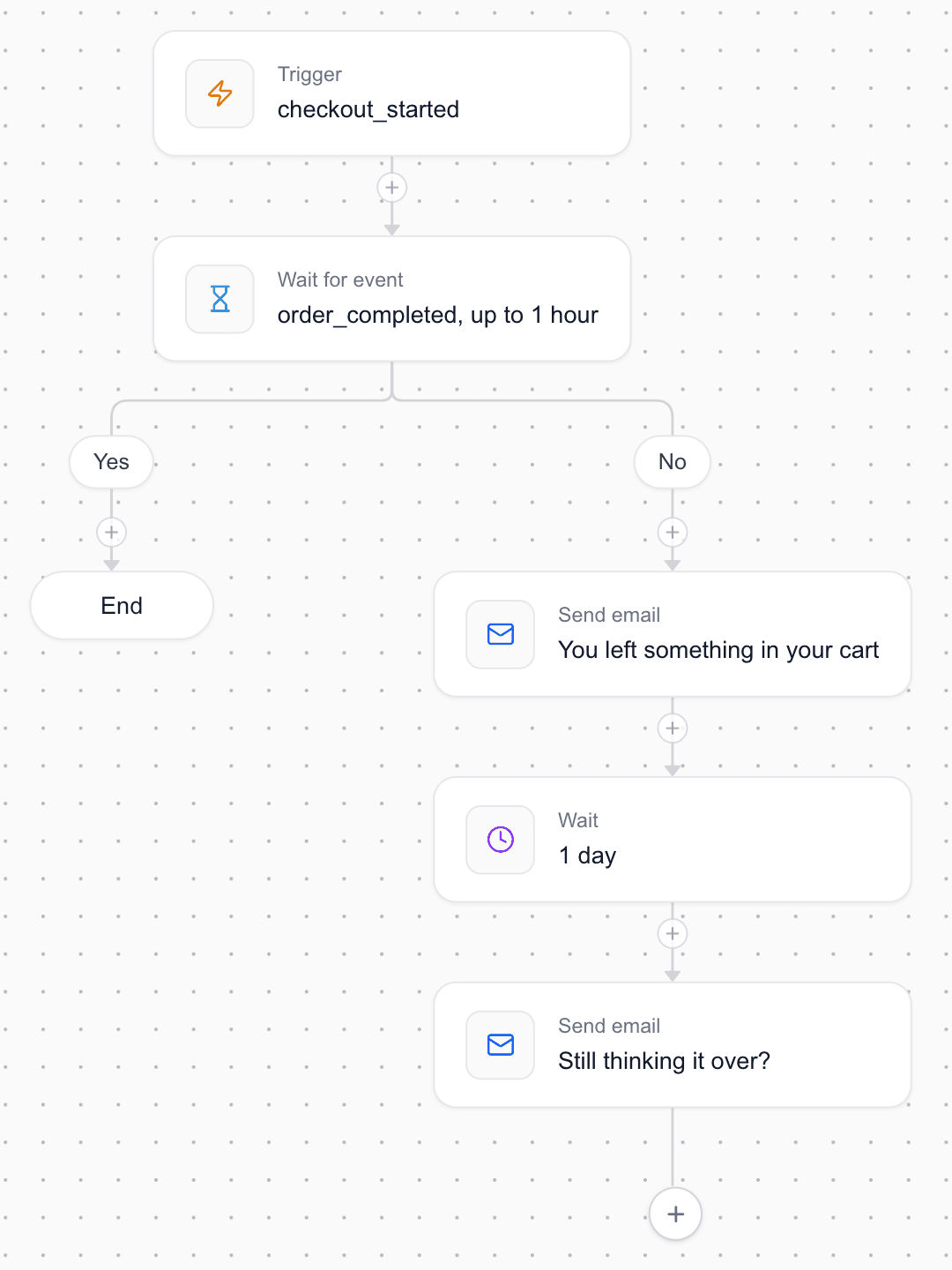
Send, wait, then ask your API whether the user did the thing and take a different path. Every node shows how many contacts are in it right now.
A visual editor your team can use
Rows, columns, merge tags and conditions, with versions you can roll back to. Developers get the same template through the API; nobody writes MJML by hand.
Delivery you can actually see
Sends, deliveries, bounces and engagement per workspace, a live feed of what went wrong, and suppressions before a bad address hurts your reputation.
An API, not a black box
Two endpoints do the work: one sends a transactional email from a template, the other feeds contact events into automations.
POST /api/triggered
{ "id": 4,
"to": "customer@example.com" }POST /api/events
{ "type": "contact_added",
"email": "new@example.com" }Open source · AGPL-3.0
Two ways to run it. Same product.
Self-host, free
Keep everything on your servers. One command brings up the whole stack.
Hosted, on senlo.io
Skip the Postgres, Redis, worker, backups and upgrades. The same product, hosted, with teams and roles on top.
Coming from somewhere else?
All comparisons →Pricing
Pay for sends, not contacts.
- 3,000 emails a month
- 1,000 workflow runs a month
- 1 member (just you)
- 3 workspaces
- 7-day email logs
- Every provider
- 50,000 emails a month
- 10,000 workflow runs a month
- 5 members
- Unlimited workspaces
- 30-day logs and audit log
- Every provider
- 250,000 emails a month
- 100,000 workflow runs a month
- Unlimited members
- Unlimited workspaces
- 90-day logs and audit log
- Every provider
Your templates, your automations, your provider.
Sign up, paste a provider key, send the first email in minutes.